 |
The instructions in this article relate to Non-Mutual Income search. The icon may be located on your StrataMax Desktop or found using the StrataMax Search. |
The Non-Mutual Income search reports transactions for a specific date range (usually the July-June tax year) where the account code is setup as Non-Mutual in Account Maintenance. Searches can be amended and saved for continuous use, plus the information can be exported to Excel. This search is for the selected Building / Plan only.
Non-mutual Income is any income that isn't received from Owners, (mutual income) such as interest on investment accounts / term deposits, lease of common property - i.e. telecommunications tower etc. This setup should be completed in conjunction with the advice of a registered tax agent / accountant. If a Building is registered for PAYG Instalment Tax in Building Information, but not GST, the report will be an Income Activity Statement (not a Business Activity Statement).
Non-Mutual Income Search | Security
To access Non-Mutual Income search the user must have permission set to 'Allow' for Non Mutual Income under the 'Menu' category in Security Setup.

Non-Mutual Income Search
Non-Mutual Income search can be used to display transactions for a period that are posted to an account that is setup as non-mutual in Account Maintenance. This is for the selected (local) building only.

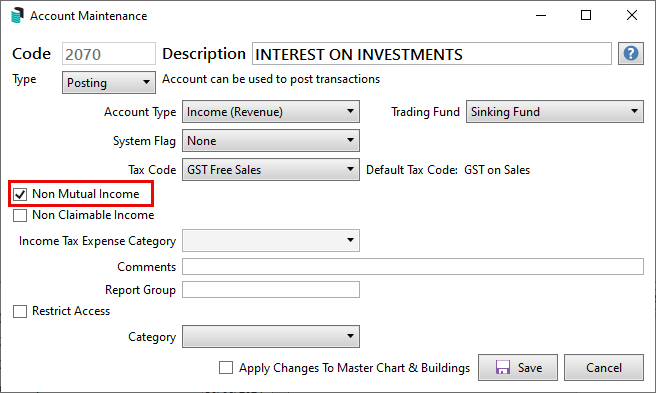
Non-Mutual Income Account Setup
- Search or select Account Maintenance.
- Locate the account code required to be set to Non-Mutual Income and click the Edit (pencil) button.
- Tick the 'Non-Mutual Income' box.
- Select 'Apply Changes to Master Chart & Buildings' if to be amended for the portfolio.
- Click Save.
- Repeat for any additional accounts that are required then close.
Non-Mutual Income Transactions - Global
To report all non-mutual transactions for the portfolio use Global Transactions with the criteria is Non-Mutual Income is equal to Yes.

Non-Mutual Income Totals - Global
To report the total non-mutual income for the portfolio use Search Income Tax and review using the Non-Mutual Income column.
Non-Mutual Income | Saved Searches
