This page contains information relating to stages of the Levy Management, Arrears & Budget re-write. The first stage focused on providing an improved user interface & experience in Levy Management; while utilising new fields from Levy Invoice Code Setup to streamline the creation of new levies based on budgets. Detailed instructions on these changes can be viewed in our Release Notes. The second stage was Arrears Management and further details can be reviewed in our article on Arrears Management - New.
Released Features
- The ability to create new levies manually or by budget in Levy Management; when produced by budget for the levy year being proposed / approved at an AGM, the periods are calculated based on your budgets and the default fields in Levy Invoice Code Setup.
- The Create Transactions & Notice button functionality replaces Generate Levies, offering a streamlined interface that displays the transactions being created, while highlighting any potential issues & manages levies with due dates that do not meet legislative requirements.
- New interfaces for Configuration, Merged Levy Notice & Split Levy Setup.
- The Merge Notice functionality will be released after completing the levy notice stage. This feature will allow the Main Account Code to be set, determining the Lot Address displayed on the notice and the lot where the notice will be filed in DocMax.
- Split Levy will allow for contact card selection and notices to be emailed to non-owners if required.
- Effortlessly create and modify custom levy entitlement schedules for any building.
- Lot Entitlements can now be set, including decimal points; buildings using the current Entitlement Factor setting will be adjusted on upgrade.
- Arrears notices now sent using the Report Distribution interface this allowing access to functions already available from that interface such as attaching additional StrataMax reports and documents, sending SMS notifications etc.
- Levy Arrears Pre-issue report enhanced to report to excel for all selected buildings and include what arrears stage will be issued if arrears is processed. Refer to the Arrears Process and Arrears Management articles.
- More flexibility for arrears fee setup with optional settings to configure arrears fees to only be charged to the building and not to the lot owner.

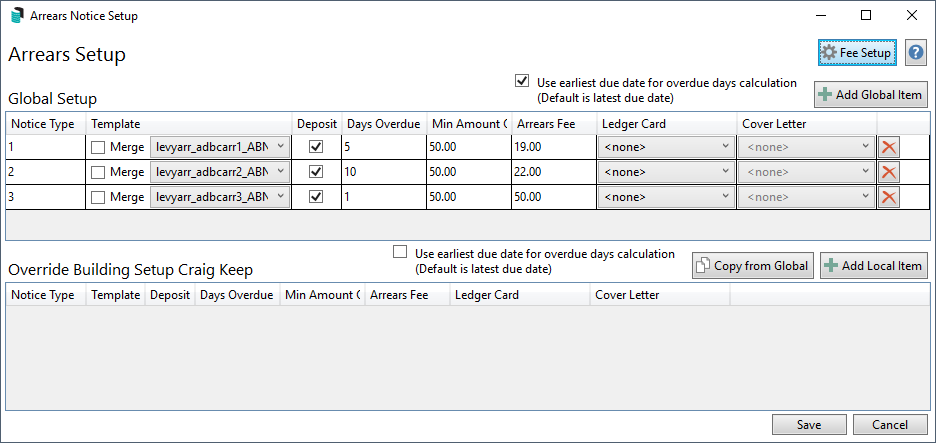
- Redesigned Arrears Setup interface displaying all the information within the one screen.
- Redesigned Arrears Manager interface used to manually manage arrears flags, disable arrears notices for specific lots, identify why a lot may not be receiving arrears notices & clear all arrears flags (useful where required after a building transfer).

Next Stages
The following stages of the Budget, Levy Management & Arrears re-write will focus on budgets & reporting. Some of the key aims are:
- Easy-to-use budget interface & new functions such as budget notes.
- Enhanced budget workflow from creating a proposed budget to approving the budget.
- Improved budget reporting, including proposed levies by lot.
- Merge levy functions to be released to allow control over the Main Account (Primary Lot.)
