Preparing for the end of a Financial Year on a building generally includes checking the financial and budget information at the end of the year. There are other areas that may need review and the purpose of this page is to assist with highlighting these.
Depending on when the account review is completed, there may be elements of producing reports from the old year. Any potential updates can be applied from the current year using Local Transactions and adjusting the Year field or using Journal Preparation with old year dates.
Report Set
The report below is an example of what could be included in a financial year-end report. Each report can be configured using the cogwheel to set the financial year and other settings.
- Search or select Report Set.
- From the Report Set area, select the financial year-end Report set. If there is no set available, one may need to be created.
- Each of these includes the cog wheel setting to update the Financial Year to the old year, where applicable.
- To prepare for all buildings that have a specific year-end, use the building selector tool and expand the filters, setting the Financial Month End. Tag all buildings and click Select.

Areas available to report and process
Financial Statements
Financial Statements will assist in confirming both the Budget and Actual posted transactions. Having a copy of this information will assist before applying any changes to any accounts. Additional reports can also be included, for example the account summary report can be useful to check the description details and where expenses have been posted to.
- Produce a Financial Statement via Financial Statements.
- Interactive Reports
Transactions
Having a set of detailed transactions that include more commonly the expenditure of a building can be useful to refer to for individual transactions. There are a few options available to report this information:
Budget Review
Reviewing the Budget column and comparing this to the actual column is recommended to assist in identifying any account codes that might need movement to align with each other. Each line item should represent a similar value and be checked.
- The Budget column is included in the Financial Statements. This article here will include additional budget report options if required.
Editing and Updating Transactions
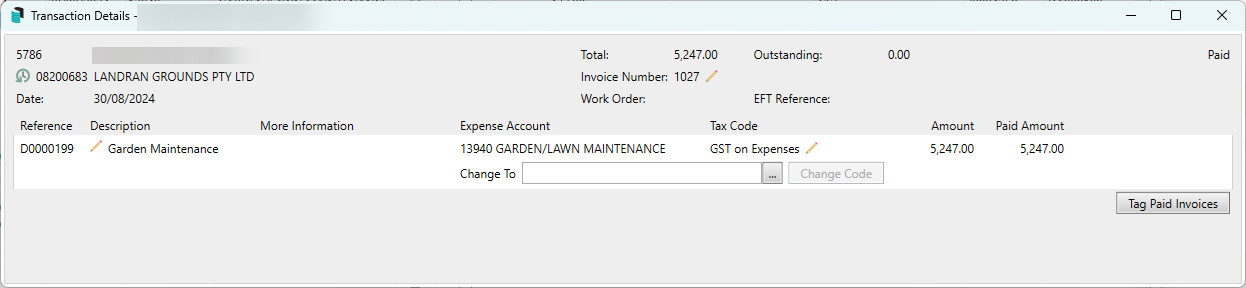
Based on the Financial Statement review, as noted in the two sections above, most of the editing and updating of transaction information can be done using Local Transactions. Transactions are available to be edited and updated for the current and old year. Historical years are not available for adjusting transactions.
- Editing descriptions of paid invoices - When reviewing, if there are any that require a description change this can be edited via Local Transactions.
- Editing descriptions of other transactions, if there are any that require a description change this can be edited via Local Transactions.
- Transactions that may have been coded to an incorrect account use Local Transactions to move the transaction to a different income or expense account.
- For any transactions that are identified using GST incorrectly, use Local Transactions to correctly apply GST.
- If adjustments have been made throughout the year, transactions that balance to zero may be hidden using Transaction Report Manager.
The Change Code Number process will change the code number from the current year and apply to all years and this should be considered before applying.
- If there is an account code identified that requires all transactions, including the Budget item, use the Change Code Number process.
- Journal Preparation can assist in other adjustments if the others above have not assisted.
Building Information
Once the financials have been completed and approved at the general meeting. The Audit Done setting can assist in marking the building appropriately.
Audit Done - Yes/No
Preparing for External Audit
Auditor reports follow a similar process. For instructions on how to prepare for an external audit, see the linked article.